


DSE Workstation Assessment and Workplace Ergonomics
DSE in Brief
Display Screen Equipment Regulations 1992 apply to anyone using a screen as a significant part of their work. Workstation assessment, eye test entitlement and breaks are the three duties; the rest is sensible workstation set-up.
Display Screen Equipment and Workplace Ergonomics
In the UK, the Health and Safety (Display Screen Equipment) Regulations 1992 place specific duties on employers where workers use DSE as a significant part of their job. The regulations predate most of the technology we now use - they were written for desktop PCs in the early 90s - but the core principle holds: if someone spends much of their working day at a screen, their workstation has to be assessed and any risks reduced.
In practice, DSE management is one of the easier parts of an H&S system to get right. The risks are well understood, the controls are inexpensive, and the assessment is something the user can do themselves with a reasonable checklist. The difficulty is not technical - it is making sure assessments actually get done, issues raised on them get acted on, and the process keeps pace as people move desks or switch to home working.
Who the DSE Regulations Apply To
The regulations apply to "DSE users" - workers who habitually use display screen equipment as a significant part of their normal work. In the UK, Health and Safety Executive (HSE) guidance treats someone as a user if they use DSE more or less continuously for an hour or more at a time, most days. That covers most office roles, most remote workers, and many mobile workers who use laptops or tablets routinely.
Workers who use DSE only occasionally, or for short spells, are not classified as users and the regulations do not require a formal assessment for them. That said, if someone occasionally uses DSE but could reasonably develop problems from it, an assessment is sensible practice anyway.
Home workers and hybrid workers who meet the user definition are covered just the same as office workers. The employer duty does not stop at the office door, which means DSE assessments need to cover the home setup too.
What a DSE Workstation Assessment Covers
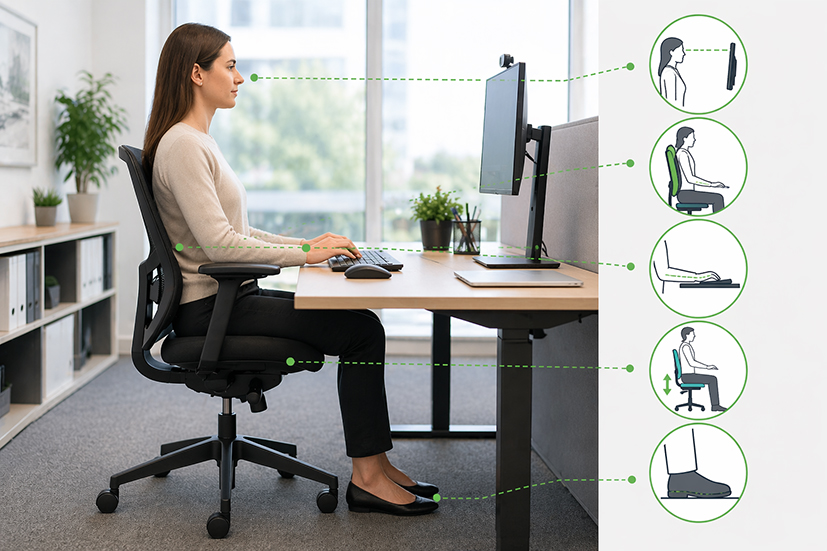
A workstation assessment looks at the whole working position, not just the screen. A reasonable self-assessment checklist prompts the user to check:
- Whether the screen can be adjusted for height, tilt and distance, and is free from reflections or glare
- Whether the keyboard and mouse are positioned so wrists and arms can stay in a neutral posture
- Whether the chair provides adequate back support and can be adjusted so the user can sit comfortably with feet flat on the floor or on a footrest
- Whether the desk is big enough for everything the user needs, with room for documents and a proper working position
- Whether lighting, temperature, noise and space around the workstation are adequate
- Whether software used is suitable for the task and usable by the person doing the work
The point of self-assessment is that the user knows their own setup and their own discomfort better than anyone else. The employer's job is to give them the checklist, act on what comes back, and step in where the user needs additional equipment or specialist input.
Breaks, Eye Tests and Training under the DSE Regulations
The DSE Regulations impose three specific duties beyond the workstation assessment itself. Employers must:
- Plan work so there are breaks or changes of activity - the regulations do not prescribe break lengths, but short frequent breaks are more effective than occasional long ones
- Provide an eye test on request for any DSE user, and any corrective glasses specifically needed for DSE work (glasses for general use are not the employer's responsibility)
- Provide health and safety training so users understand the risks and how to set up their workstation correctly
The eye test duty is often misunderstood. The employer must pay for the test and for glasses that are specifically required for DSE use. If a user already wears glasses and would need them regardless, the employer is not required to fund those. Most organisations meet this by offering a voucher scheme.
Ergonomic Risks from Prolonged Sitting
The original DSE Regulations focused on specific risks - musculoskeletal strain, visual fatigue, mental stress from unsuitable software. Research since has broadened the picture. Prolonged sitting is now recognised as a health risk in its own right, linked to cardiovascular disease, metabolic conditions and musculoskeletal problems that go beyond the wrist and neck strain the regulations originally focused on.
The practical response is not complicated. Encourage users to stand up, move about and take short breaks through the day. Arrange tasks so that nobody needs to sit continuously for hours at a time. Make it easy to take phone calls away from the desk, walk to speak with a colleague rather than email, and use meetings that do not require everyone to stay seated. Sit-stand desks can help where the budget allows, but they are not a substitute for movement.
DSE Assessments for Home and Hybrid Workers
Home workers present the same hazards as office workers plus a few extra. The home setup is often an improvisation - a dining table, a kitchen stool, a laptop without an external monitor or keyboard. The employer cannot inspect every home in the way they would an office, but they are still responsible for making sure the home workstation is suitable.
The practical approach is a home working checklist that the user completes themselves, covering the same ergonomic points as an office DSE assessment plus questions on lighting, noise, and electrical safety. Where the checklist flags a problem the employer cannot fix remotely - a chair that cannot be adjusted, a poor lighting setup, no space to work properly - the employer needs to decide what support to provide. For regular home workers, funding an office chair, a second monitor or a docking station is usually cheaper than the musculoskeletal claims that poor home setups eventually produce.
The DSE regs are probably the most-ignored part of H&S law that I come across. Assessments get done once when someone starts, filed away, and never looked at again even when the person has moved desk three times since.
My rule of thumb - if someone has changed their workstation, their equipment or their working pattern, the assessment needs revisiting. Annual review as a backstop catches the rest.
On eye tests, pay the voucher, pay for the DSE-specific glasses if they are needed, do not try to be clever about it. The regulatory risk from getting this wrong is tiny but the goodwill value from getting it right is enormous.
People overthink DSE. Half of what the regs want is just sensible setup anyone would do if they stopped and looked at their desk.
The checklist is not a chore, it is the easiest way to catch problems early - before someone goes off sick with a neck that has been bothering them for six months because the monitor is too low.
We hit a tipping point with hybrid working and had to get our act together on home DSE assessments. The office setup was fine but nobody had looked at what people were doing at home.
We issued the home working checklist, funded office chairs for the regular home workers, and got a load of monitors out through the post. Cost us a couple of thousand and the claim we were dealing with went away.
Practical Compliance Guidance
DSE management sits alongside the wider health and safety arrangements in the IMS1 Manual. The DSE assessment process, eye test provision and home working checks are part of the operational controls the management system puts in place under risk assessment and operational planning.
The alphaZ documents below give you a self-assessment checklist, a plain-language guide for users, a risk assessment template and a separate home working checklist. Between them they cover what the regulations require and what most organisations actually need to run a DSE process.
| alphaZ document | How to use it |
|---|---|
| ISO 9001, 14001 and 45001 IMS Toolkit | Full integrated management system toolkit containing all the DSE documents listed below alongside the wider management system templates. |
| F-HS18 DSE Self Assessment Form | Self-assessment checklist the user completes themselves covering screen, keyboard, chair, desk, environment and software. Completed forms go back to the employer for review. |
| GG-7-17 Safe Use of Display Screen Equipment | Plain-language guidance on safe use of DSE suitable for issuing to workers during induction or as reference material. |
| RA-HS111 Display Screen Equipment Risk Assessment | Example risk assessment covering the hazards associated with DSE use and the control measures employers are expected to have in place. |
| F-Q72 Home Working Checklist | Checklist for workers who work from home to complete, covering the home workstation alongside lighting, electrical safety and the wider working environment. |
| RA-HS112 Working from Home Risk Assessment | Example risk assessment for home-based workers covering the broader set of risks associated with home working, not just the workstation. |
| Toolbox Talk - Safe Use of DSE | Short training talk that can be delivered as part of induction or an ongoing awareness programme to reinforce DSE good practice. |
Note - all the above files can be downloaded with an alphaZ subscription.
Frequently Asked Questions
UK Legislation
The following UK legislation is directly relevant to Display Screen Equipment and Workplace Ergonomics. Organisations outside the UK should identify the equivalent legislation applicable in their jurisdiction.
- Health and Safety (Display Screen Equipment) Regulations 1992
- Health and Safety at Work etc. Act 1974
- Management of Health and Safety at Work Regulations 1999
